
Key takeaways
- Changing your IP address fixes exactly one signal. Detection systems read dozens, and the others are usually still pointing at you.
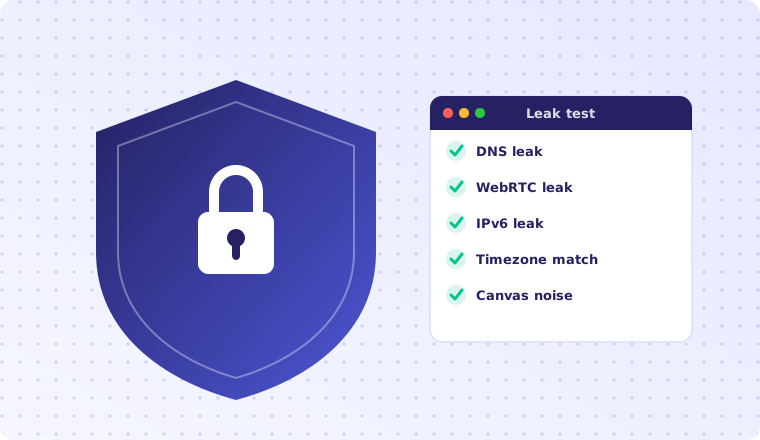
- The three classic leaks are DNS, WebRTC and IPv6. All three bypass the proxy entirely, and all three are trivially fixable once you know they exist.
- Consistency beats obscurity. A rare, "hardened" configuration is more identifiable than a common one, because uniqueness is the fingerprint.
- Timezone, locale and language must agree with the exit IP's claimed location, or you have created a contradiction that is easier to spot than the original problem.
- Verify by testing, not by trusting. Run the checks below after every configuration change.
There is a comfortable assumption behind most proxy purchases: route the traffic somewhere else, and you become someone else. It is wrong, and the gap between that assumption and reality is where most "why am I still being blocked?" tickets live. This article maps the whole surface — what leaks, why, how to test for it, and what a coherent configuration looks like.
The layered model of identification
Think of identification as a stack. Each layer contributes signals, and a modern detection system correlates across all of them. Fixing one layer while leaving the others untouched does not make you anonymous; it makes you inconsistent, which is worse.
| Layer | Signals it emits | Does a proxy help? |
|---|---|---|
| Network | IP, ASN, geolocation, reverse DNS, open ports | Yes — this is the whole job |
| Transport | TLS ClientHello order, JA3/JA4 hash, HTTP/2 SETTINGS frame | No |
| Protocol | Header order, casing, Accept-Language, encoding support | No |
| Browser | Canvas, WebGL, fonts, screen, audio context, plugins | No |
| Behaviour | Mouse paths, dwell time, scroll rhythm, request cadence | No |
| Account | Cookies, tokens, login history, payment instruments | No |
One row out of six. That is what a proxy buys, and it is genuinely valuable — the network layer is the heaviest single input in most scoring models — but the other five keep working regardless.
Leak one: DNS
Your browser resolves example.com before it can connect. If that lookup goes to your own ISP's resolver instead of through the proxy, the resolver operator sees every hostname you visit, and the target site can sometimes observe the mismatch between your apparent location and the resolver's.
The most common cause is the difference between two SOCKS modes that differ by a single character:
# WRONG — hostname is resolved locally, then the IP is sent to the proxy
curl --socks5 127.0.0.1:1080 https://example.com

# RIGHT — hostname is sent to the proxy and resolved at the exit
curl --socks5-hostname 127.0.0.1:1080 https://example.com

# Python requests: note the 'h'
proxies = {"https": "socks5h://user:[email protected]:1080"}
In Chromium-based browsers, force remote resolution:
chrome --proxy-server="socks5://127.0.0.1:1080" \
       --host-resolver-rules="MAP * ~NOTFOUND , EXCLUDE 127.0.0.1"
In Firefox, set network.proxy.socks_remote_dns = true in about:config. Then verify — do not assume.
Leak two: WebRTC
WebRTC exists so browsers can do peer-to-peer audio and video. To find a path between peers it runs ICE candidate gathering, which asks STUN servers "what does my address look like from outside?" — and it does this outside the browser's normal proxy configuration. A few lines of JavaScript on any page can read the result.
What leaks depends on the browser and settings: often your local network address, and in the worst case your real public address even while a proxy is active.
Fixing it
- Firefox: set
media.peerconnection.enabled = falseinabout:config. Blunt but effective. - Chromium: launch with
--force-webrtc-ip-handling-policy=disable_non_proxied_udp, or use a policy-managed extension. Note that Chrome removed the old user-facing toggle. - Any browser: block UDP outbound at the firewall so ICE cannot reach STUN servers at all.
Test it directly rather than trusting a settings screen:
// Paste into the console. Anything printed here is visible to any page.
const pc = new RTCPeerConnection({
  iceServers: [{ urls: "stun:stun.l.google.com:19302" }]
});
pc.onicecandidate = e => e.candidate && console.log(e.candidate.candidate);
pc.createDataChannel("x");
pc.createOffer().then(o => pc.setLocalDescription(o));Leak three: IPv6
Plenty of proxy setups only handle IPv4. If the host has working IPv6 and the target publishes an AAAA record, the connection may simply take the IPv6 path and skip the proxy entirely. This one is easy to miss because everything appears to work.
# Do you have IPv6 connectivity at all?
curl -6 -s https://api64.ipify.org ; echo

# Disable it system-wide on Linux if your proxy is v4-only
sysctl -w net.ipv6.conf.all.disable_ipv6=1
sysctl -w net.ipv6.conf.default.disable_ipv6=1

# Windows, per adapter
netsh interface ipv6 set global randomizeidentifiers=disabled
# (or untick IPv6 on the adapter's properties page)
Better than disabling: use a proxy that supports IPv6 properly. Increasingly, having no IPv6 at all is itself an oddity.
The TLS and HTTP/2 fingerprint
Before any HTTP request is sent, your client performs a TLS handshake. The exact contents of the ClientHello — cipher suite order, extension list and order, supported groups, signature algorithms — vary between implementations. Hashing that structure yields a JA3 (or the newer JA4) fingerprint.
This is where most scrapers give themselves away instantly. Python's requests library produces an OpenSSL fingerprint that no browser on earth produces. Sending User-Agent: Mozilla/5.0 ... Chrome/126 alongside it is a direct contradiction: the headers claim Chrome, the handshake says Python. That single mismatch is enough for a confident block.
HTTP/2 adds more of the same: the SETTINGS frame values, the header pseudo-order and the priority tree also differ between clients.
What to do about it
- Use a client that actually mimics a browser handshake —
curl-impersonate, or thecurl_cffibindings in Python. - Or drive a real browser (Playwright, Puppeteer) so the handshake is genuinely Chrome's.
- Keep the User-Agent aligned with whatever produced the handshake. Never claim to be a browser you are not.
# Python: a real Chrome TLS fingerprint
from curl_cffi import requests
r = requests.get("https://example.com", impersonate="chrome124")

# Command line equivalent
curl_chrome116 https://example.com
Browser fingerprinting
Given a rendering engine, a page can extract a great deal of stable, high-entropy information:
- Canvas. Draw text and shapes, read back pixels. GPU, driver and font rasterisation produce subtly different output.
- WebGL. Unmasked vendor and renderer strings, plus precision characteristics.
- Fonts. Measure the rendered width of strings to enumerate installed fonts — a surprisingly identifying set.
- Audio. Run an oscillator through an offline context and hash the output.
- Screen and window. Resolution, colour depth, device pixel ratio, available height (which reveals taskbar size).
- Hardware.
hardwareConcurrency,deviceMemory,maxTouchPoints. - Timezone and locale.
Intl.DateTimeFormat().resolvedOptions().timeZone,navigator.languages.
You can see most of these for your own browser, computed entirely locally, on our privacy check page.
The consistency principle
The instinct is to randomise everything. This backfires. A fingerprint that changes on every page load is itself a detectable pattern, and combinations that do not occur in nature — a Windows User-Agent with macOS fonts, a 4K screen with a 1×1 viewport, an Android UA with a desktop GPU string — are far more suspicious than a plain, common configuration.
Aligning geography with everything else
If your exit address is in Chicago, then everything else must agree:
| Signal | Should be | How to set it |
|---|---|---|
| Browser timezone | America/Chicago | OS setting, or Playwright timezoneId |
| Accept-Language | en-US,en;q=0.9 | Browser locale / launch flag |
navigator.languages | ["en-US","en"] | Set the OS locale, don't patch the property |
| Geolocation API | Denied, or Chicago coordinates | Context permissions |
| Currency / units | USD, imperial | Follows locale |
| Clock accuracy | Within a second of real time | NTP on the host |
// Playwright: one coherent identity, not a pile of patches
const ctx = await browser.newContext({
  locale: 'en-US',
  timezoneId: 'America/Chicago',
  geolocation: { latitude: 41.8781, longitude: -87.6298 },
  permissions: ['geolocation'],
  viewport: { width: 1512, height: 852 },
  proxy: { server: 'http://gate.example.net:7000',
           username: 'user-country-us-city-chicago', password: 'PASS' }
});
Behavioural signals
Once the technical layers are coherent, behaviour becomes the discriminator. Systems watch for:
- Perfectly regular request intervals — real humans are noisy.
- Instant form fills with no focus, keypress or blur events.
- Mouse cursors that teleport rather than travel.
- Navigation that never loads CSS, images or fonts.
- Page dwell times far shorter than a human could read in.
- Sessions with no scroll events on a page that requires scrolling.
You do not need elaborate simulation. Randomised delays drawn from a plausible distribution, loading the page's subresources, and using a real browser engine cover most of the gap.
import random, time

def human_pause(base=1.4, spread=0.8):
    """Log-normal-ish delay: mostly short, occasionally long."""
    time.sleep(max(0.25, random.lognormvariate(0, 0.45) * base - spread * 0.2))
A verification routine you can run in five minutes
Run this after every configuration change. Not once — every time.
- Exit address. Confirm the public IP is what you expect, over both IPv4 and IPv6.
- DNS. Confirm resolution happens at the exit, not locally.
- WebRTC. Run the ICE snippet above and read the candidates.
- Timezone and locale. Compare against the exit's claimed city.
- TLS fingerprint. Confirm the handshake matches the browser you claim to be.
- Headers. Check order, casing and the presence of client hints a real browser would send.
- Fingerprint sanity. Look for impossible combinations, not for uniqueness.
# Quick shell checks
curl -s --proxy $P https://api.ipify.org  ; echo   # v4 exit
curl -s --proxy $P https://api64.ipify.org ; echo  # v6 path
curl -s --proxy $P https://httpbin.org/headers     # header order & casing
Operational hygiene
Technical configuration is only half of it. The other half is discipline:
- One identity, one profile, one exit. Never mix contexts in a single browser profile — shared cookies link everything.
- Persist profiles deliberately. A brand-new profile every session is as odd as never clearing anything.
- Watch the clock. A host whose time drifts by minutes stands out; keep NTP running.
- Keep the browser current. An outdated version is a small but real distinguishing feature.
- Log your own failures. Track challenge rate per target over time — a rising trend is your early warning system.
A word on legality and ethics
None of this removes obligations. Terms of service still bind you, computer-misuse and data-protection statutes still apply, and personal data collected through a proxy is still personal data under GDPR, CCPA and their equivalents. Reducing detection is a technical outcome, not a legal permission.
Practical guidance: respect robots.txt where it applies to you, do not attempt to access anything behind an authorisation boundary you were not granted, keep your request volume proportionate so you are not degrading someone else's service, and if the work touches personal data, involve whoever handles compliance in your organisation before you start. This article is technical information, not legal advice.
The short version
Fix the leaks first — DNS, WebRTC, IPv6 — because they undo everything else. Then make your layers agree: handshake, headers, timezone, locale and exit geography telling one consistent story. Then aim for common rather than clever. And verify by measurement after every change, because the only configuration you can trust is the one you just tested.
See your own browser's exposure, computed entirely on your device, on the privacy check page. For choosing the right exit pool in the first place, read residential versus datacentre proxies.